Capturing a lead is only the beginning.
You can invest in Google Ads, social media, content, or landing pages to get new contacts. But if it then takes you hours to respond, someone has to call manually, update the CRM, find a slot in the calendar, and follow up, you still have a manual sales process.
The good news is that today you can automate much more than just capture.
In this article, we explain how to automate lead generation with AI and, above all, how to connect everything that happens after: calls, qualification, CRM, calendar, emails, follow-up, and conversion.
How to automate lead capture?
Automating lead capture consists of using software and artificial intelligence to collect, contact, qualify, and follow up on potential clients automatically. The goal is not simply to get more contacts, but to convert more opportunities without proportionally increasing the sales team's workload.
For example, when a person leaves their details on a landing page, an automated process can:
Receive and register their details.
Contact them automatically.
Hold a conversation to understand what they need.
Consult information about the company or its services.
Qualify the opportunity according to defined criteria.
Check the team's availability.
Book a meeting or demo.
Update the CRM.
Send a confirmation or follow-up email.
Trigger new actions depending on what happened during the conversation.
The real value lies in connecting all these steps within a single process.
The problem is not getting leads, but what happens next
Imagine a campaign generates 100 new contacts.
In theory, you have 100 sales opportunities.
In practice, someone has to review the forms, call each person, answer their questions, check if they fit the service, find a slot in the calendar, update the CRM, and remember to follow up with those who did not answer.
When the volume grows, the problem becomes obvious.
Every new lead generates manual work.
Additionally, there is another problem: speed.
A person who has just requested information is showing interest at that exact moment. If they receive a call or an email several days later, they might already be comparing other options.
That is why automating lead capture is not only about automating how contacts come in.
It consists of automating what happens from the moment an opportunity appears until it is ready to be handled by a person or converted into a client.
What parts of lead capture can you automate?
AI allows you to automate many more stages of the sales process than those traditionally associated with a form or a chatbot.
1. Capture and organize leads
The first step is to get new contacts to enter your system automatically.
When someone completes a form, requests information, or performs a specific action on your website, their details can be used to trigger the next step of the process.
This way, you avoid tasks like copying data between tools or manually checking who has entered during the day.
2. Contact immediately
Once a lead exists, you can trigger a call automatically.
This is especially useful when response speed is important.
Instead of waiting for a sales rep to have time to call, an AI voice agent can start the conversation and check what that person needs.
For example:
"Hi, I am the virtual assistant for Company X. We received your request for information and I wanted to ask you a few questions to help you better. Do you have a minute?"
The conversation can adapt based on the user's answers.
3. Qualify the opportunity
Not all leads have the same value.
An agent can ask the necessary questions to determine if an opportunity meets the criteria defined by the company.
For example:
What product or service they need.
What size their company is.
When they want to start.
What budget they have.
What location they are in.
What problem they want to solve.
AI can use those answers to determine what should happen next.
4. Consult information and answer questions
Automation does not have to be limited to following a fixed script.
An agent can consult the information it needs to answer specific questions and maintain a more natural conversation.
For example, a clinic could use it to explain its services, a real estate agency to answer questions about a property, or a SaaS company to explain the features of its product.
The user does not need to know what tool the agent is consulting. They simply get an answer.
5. Consult the calendar and book a meeting
This is where automation starts to close the loop.
If the lead is qualified, the agent can check calendar availability and offer a suitable time.
Instead of:
"I'll send you the link so you can book."
it can happen like this:
"I have availability tomorrow at 11:00 AM or Thursday at 4:30 PM. Which one works better for you?"
The meeting can be booked directly and the process continues without manual intervention.
6. Update the CRM
A sales conversation generates valuable information.
If that information stays solely in a transcript or in a sales rep's notes, part of its usefulness is lost.
An automated process can record relevant data in the CRM: lead information, conversation outcome, qualification level, next action, or opportunity status.
This way, when a team member joins the conversation, they already have context.
7. Send emails and follow up
Was the lead not ready to book a demo?
The process does not have to end there.
You can trigger a follow-up flow depending on what happened during the conversation.
For example:
Lead → call → interested → email with information → follow-up → new call → demo
This allows automation to keep working even after the first interaction.
From lead capture to an automated sales process
This is the most important change.
For years, companies have used different tools for each part of the process:
Form + telephony + AI + CRM + calendar + automation + email.
Each tool resolves a piece, but someone has to connect all the pieces.
The result is usually a complex infrastructure, difficult to maintain, and increasingly expensive as it grows.
With an AI agent platform like Diga, the goal is different.
You can build a flow in which the conversation is the starting point and the AI can execute actions in different tools based on what happens.
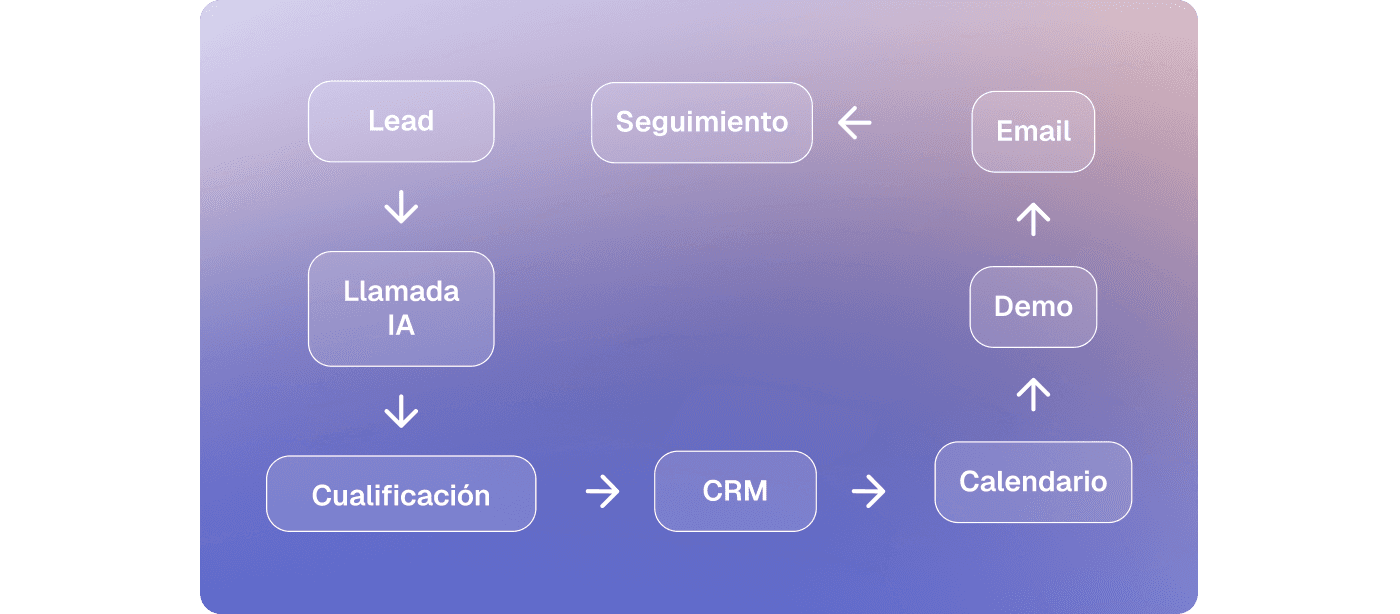
The agent does not just talk.
It talks and does things.
That difference is key.
What can you automate with Diga?
Diga allows you to create voice agents capable of interacting with people and executing actions within an automated process.
For example, you can create an agent that:
Automatically calls new leads.
Maintains a natural conversation.
Consults information to answer questions.
Qualifies opportunities.
Checks data in your systems.
Consults calendar availability.
Books demos, appointments, or meetings.
Updates the CRM.
Sends emails.
Triggers subsequent flows.
Escalates a conversation to a human when necessary.
All of this can be adapted to different use cases.
And you do not need to program the agent from scratch. With Melo, Diga's copilot, you can describe in natural language what you want the agent to do and then review and adjust the result.
For example:
"I want an agent to call the leads that come from my form, ask them what service they need, check if they are qualified, consult my calendar, and book a demo if they are interested."
Instead of manually building each piece of the automation, you start by describing the outcome you want to achieve.
Try this flow with a free template
You do not have to build this process from scratch.
We have prepared a free voice agent template for lead capture that you can use as a starting point in Diga.
The template is designed to automatically contact a lead after they leave their details, hold a conversation to find an available time, and book the appointment directly in Google Calendar. After the call, the flow can update the lead in HubSpot and send the corresponding email.
The flow works like this:
Form → AI call → availability → appointment → CRM → email
You can use the template as is or adapt it to your own sales process: change the questions, adjust the qualification criteria, modify the duration of appointments, or connect your own tools.
👉 Try the lead capture template in Diga for free
It is a good starting point if you want to see how automation can work in a real case before building a more advanced flow.
Lead automation for any business
Lead capture is just one of the use cases.
The same logic can be applied to virtually any business where there is a conversation followed by an action.
Agencies and consultancies
An agency can use AI agents to manage its own lead generation or create automations for its clients.
For example:
Lead → call → qualification → CRM → sales meeting.
Additionally, it can replicate the system for different clients without having to build a completely new technology infrastructure each time.
Clinics
A clinic can automate new patient care:
Call → identify need → explain service → check availability → book appointment → send confirmation.
The agent can also handle frequently asked questions and follow-up tasks.
Real Estate
A real estate agency can automate the first contact with buyers or owners:
Lead → call → needs → budget → qualification → CRM → visit.
The team receives opportunities with much more information right from the start.
SaaS Companies
A B2B company can automate part of its sales process:
Lead → call → qualification → questions about the product → calendar → demo → CRM → follow-up.
In this case, the goal is not to replace the sales team, but to prevent them from having to spend their time on every previous step.
Local businesses
Restaurants, beauty salons, repair shops, hotels, or any business that handles calls can use agents to answer questions, manage bookings, handle requests, and follow up.
The use case changes. The logic is the same: talk, understand, and act.
Why automate the whole flow and not just the call?
Because an isolated call only solves part of the problem.
Imagine an agent calls a lead, finds out they are interested, and then someone has to:
Copy the information to the CRM.
Open the calendar.
Search for availability.
Book the meeting.
Send the email.
Update the lead status.
Schedule the follow-up.
You have automated the conversation, but you still have a manual process behind it.
When actions are connected, automation makes much more sense.
AI can take care of executing the entire process, and the human team can step in only when they bring value that automation cannot provide.
The goal is not to eliminate the sales team. It is to eliminate the work that does not need the sales team.
How to start automating lead capture
You do not need to automate all your processes on day one.
In fact, starting with a very specific use case is usually the best strategy.
Step 1: identify the bottleneck
Does it take you too long to call leads?
Do sales reps waste hours qualifying?
Are there many repetitive calls?
Do leads get very little follow-up?
Start with the problem that has the biggest impact.
Step 2: define what the AI should do
Specify what information it needs to obtain, what questions it should ask, and what conditions determine the next step.
Step 3: connect the actions
The agent should be able to do something with the information it gets.
For example, book an appointment, update the CRM, or start a follow-up flow.
Step 4: start with a single flow
You do not need to build a massive solution.
A good first case can be:
New lead → automatic call → qualification → demo booking.
Later, you can add CRM, emails, follow-up, and other processes.
Step 5: analyze the conversations
Automation improves when you observe what happens in real conversations.
Identify frequent questions, points of friction, and cases where the agent needs to improve.
Automated capture does not end with the lead
Getting a contact is important.
But the opportunity lies in everything you can do afterward.
A truly automated system can receive the lead, start a conversation, understand their needs, consult information, make decisions based on rules, update your tools, and complete actions like booking a meeting or sending an email.
That is the leap between using AI to automate a task and using AI to automate an entire process.
And the more processes you can manage from a single platform, the less you depend on a collection of disconnected tools.
Do you want to try it?
Start with a specific process in your business and see how far automation can go.
With Diga, you can create your agent, connect your tools, and define what should happen after each conversation.
Create your first AI agent and turn lead capture into a process that works automatically for you.
Automate the complete process, not just the call
Your team should not have to manually move every piece of a sales process.
The lead arrives. The AI converses. The system acts.
With Diga, you can create voice agents, connect them to your tools, and automate everything from the first contact to actions like qualifying opportunities, updating the CRM, booking a demo, or triggering a follow-up.
Start with a specific use case and scale from there.
Create your first AI agent with Diga and automate the process that takes up most of your team's time today.