A few days ago I created a voice agent for a clinic, added its website as a knowledge base, and reviewed why a test call had failed.
I did not open the Diga dashboard at any point.
I did it from Claude, writing what I wanted as if I were asking a colleague.
This is possible thanks to MCP (Model Context Protocol), a standard that allows connecting AI models with external tools and systems in a common way.
In this article, we are going to explain what MCP is, what problem it solves in voice agents, how it works in Diga in both directions, and what we have learned building it.
Because there is an important difference between an AI being able to talk about your platform and being able to actually use it.
What is MCP and what is it used for in voice agents?
MCP (Model Context Protocol) is an open standard that allows an AI application to discover and use external tools and data. Instead of creating a different integration for each model, MCP defines a common way to expose those capabilities so that compatible clients can discover and use them.
Put simply: MCP is a connection layer between an AI and the tools it needs to get things done.
An MCP server can expose tools that a model can discover and use. For example, checking a calendar, searching for information in a CRM, or creating a record.
The idea is similar to USB-C: it doesn't mean all devices do the same thing, but rather that there is a standardized way to connect them.
And this is especially interesting for voice agents, because an agent that only converses has a limited scope. An agent that can use tools can query information, take actions, and complete processes during a call.
The problem: integrating every tool was handcrafted work
A voice agent that only talks is useful for some cases.
But think about a real call:
— I wanted to change my appointment on Thursday.
— Sure, let me check availability.
To respond correctly, the agent needs to query an external system.
Until now, connecting that system usually involved defining the integration manually: which endpoint to call, what parameters to send, how to authenticate, and what information the model needed to receive to use it correctly.
For a proprietary API, this remains a valid and flexible option. In Diga, you can do this using HTTP integrations.
But when you have many systems and many operations, the complexity increases rapidly.
MCP standardizes precisely that connection layer.
An MCP server can describe what tools it offers, what parameters they need, and how to use them. The compatible client can discover those tools and make them available to the model.
The difference is not that MCP eliminates all integration work. It is that it reduces the specific work that each client has to do to understand how to use it.
MCP inwards: your voice agent uses external tools
This is probably the easiest use case to understand.
Imagine a clinic whose appointment management system exposes tools via MCP.
A patient calls:
— I wanted to change my appointment on Thursday.
— Sure, let me check that for you.
The agent checks availability.
— I have an opening on Friday at 10:00 or Monday at 16:30. Which one works better for you?
The agent has used an external tool during the conversation.
In voice, this has a particularity: the user is waiting while the tool is working.
That's why it's not enough to just connect a tool and let the model decide what to do. You also have to design how the agent behaves around that action.
For example:
Notify the user before performing a query that might take some time.
Avoid long silences during the wait.
Ask for confirmation before major actions.
Explain the outcome briefly.
Have a defined behavior if the tool fails.
The tool may come from a server you don't control, but the voice experience remains the responsibility of your agent.
MCP outwards: now Diga can also be a tool
This is where the concept gets especially interesting.
Until now, we've talked about a Diga agent using external tools.
But we can turn it around:
What if it were your AI assistant that could use Diga?
That is exactly what Diga's MCP server allows.
You can connect compatible clients like Claude, Cursor, or Codex to Diga using a project API key. Once connected, the assistant can discover the available tools and use them according to the permissions of that key.
Instead of entering the dashboard and doing each action manually, you can ask for things like:
“Create an agent for a real estate agency that qualifies buyers and collects their data.”
Or:
“Upload this clinic's website as a knowledge base.”
Or:
“Why did this agent's last call fail?”
Or even:
“How many minutes have we used this month and which numbers do we have active?”
Depending on the API key permissions, the Diga MCP server allows managing agents and versions, querying calls and their logs, creating knowledge bases, managing numbers, integrations, webhooks, and flows, as well as querying other project resources.
Diga stops being solely an interface you use and becomes a tool that your AI can use.
How does it work?
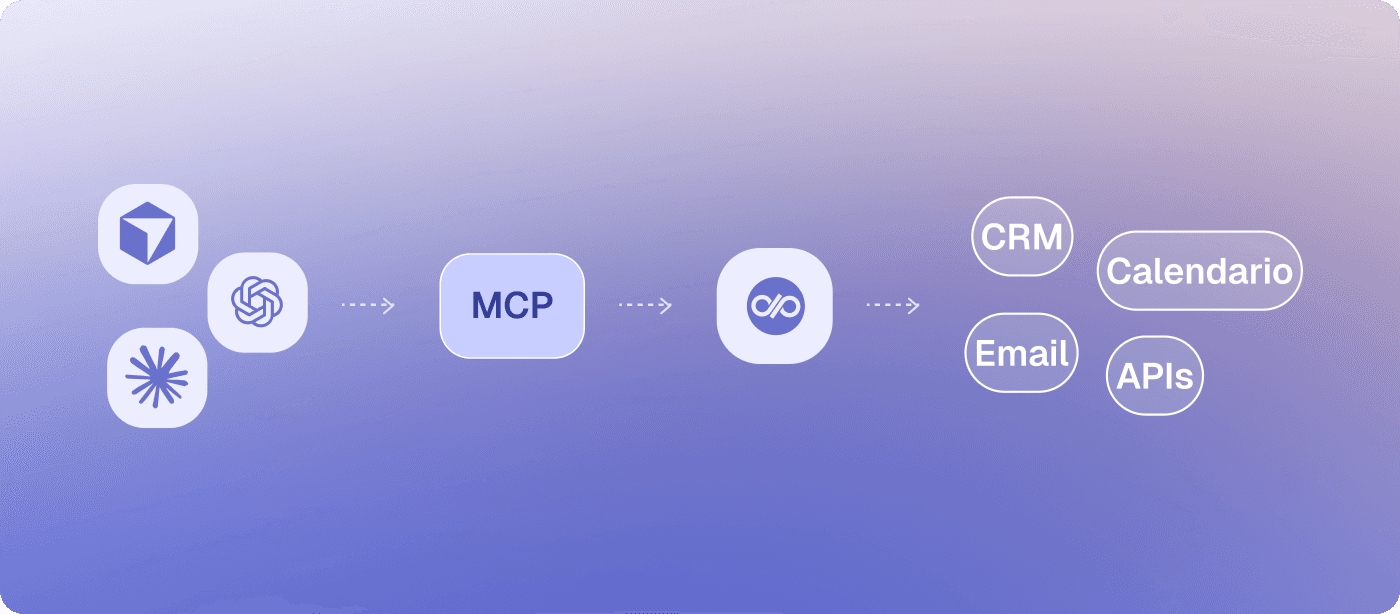
The architecture is quite simple:
Your AI assistant → Diga MCP server → Diga tools
The client connects to the Diga MCP server via Streamable HTTP and authenticates with an API key associated with a project. The key determines which project the assistant manages and what permissions it has.
The configuration is brief, and you can find it in our Diga MCP server documentation.
Tip: start with a read-only action, such as listing your agents, before granting permissions to modify or delete resources.
Melo uses this same approach
MCP didn't just appear out of nowhere within Diga either.
Melo, our copilot, has been using tools to work with Diga from the very beginning.
When you ask it to modify an agent, check a call, or configure part of a project, it needs to use platform operations to do so.
And building Melo taught us an important lesson.
At first, we did something quite logical: take our API and expose its endpoints as MCP tools, returning virtually the same information that the API returned.
It worked.
But it didn't work particularly well.
An API for software is not necessarily a good API for an AI
The problem was the responses.
You asked for the list of agents, and the model received complete agent objects, with prompts, configuration, flows, and metadata.
You asked for information about a call, and it could receive a massive amount of related data.
The context window filled up quickly.
And it wasn't just a quantity problem. Too much information can also make the model make worse decisions.
It's like asking a person how many agents you have and handing them a forty-page report first.
The information is there, but finding the right data point becomes harder.
The solution was to design the tools with a focus on how a model uses them:
Lists with only the actually necessary fields.
Additional detail only when a specific resource is requested.
Pagination for resources that can grow.
Smaller responses oriented toward the next decision.
The conclusion was clear:
An API designed for programs is not always an API designed for models.
A program can easily ignore a hundred fields it doesn't need. A model has to process that context before deciding what to do with it.
MCP does not mean “just connect everything and that's it”
It's easy to fall into the trap of thinking that the more servers and tools you connect, the more powerful your agent will be.
In reality, the exact opposite can happen.
More tools can mean worse decisions
If an agent has access to fifty tools, it will have more possibilities to do things.
But it will also have more chances of choosing the wrong tool.
In a voice agent, this is even more critical because every decision happens within a real-time conversation.
That's why we recommend assigning only the tools that each agent truly needs.
MCP does not make a slow tool fast
MCP standardizes how tools are discovered and used, but it does not make the underlying system respond faster.
If a tool takes two seconds, the user will perceive those two seconds.
And in a voice call, latency matters much more than in a web interface.
If you want to delve deeper into how latency works in voice agents, you can check our analysis on Speech-to-Speech.
You also depend on the external server
When you use an MCP server you don't control, you depend on how it's designed and the changes its provider makes.
A tool might change its parameters, cease to exist, or start returning different information.
That's why MCP simplifies the connection, but it doesn't eliminate the need to monitor it.
Security: giving tools to an AI also means giving it permissions
This part is especially important when we talk about MCP outwards.
If you connect an AI to Diga, you are allowing that AI to perform certain actions on a project.
That is why Diga API keys are associated with a project and can be restricted according to the permissions the assistant needs. The documentation recommends using different keys per client and environment, granting only the necessary permissions, and reviewing actions that modify or delete resources.
The rule is simple:
An AI should have exactly the permissions it needs to do its job, not all the ones it might eventually need one day.
Start with read actions and increase permissions progressively.
What MCP changes for voice agents
Until now, a big part of automation consisted of connecting applications to each other.
A company had a CRM, a calendar, a telephony system, a database, and several automation tools. Each connection needed its own configuration.
MCP points toward a more standardized layer so that AI applications can discover and use tools from different systems.
In voice agents, this opens up an especially interesting possibility: the agent can not only talk to a person; it can talk to the systems it needs to resolve what that person is asking for.
And the other way around: your AI assistant can not only talk about your agents; it can create, modify, analyze, and manage them.
This shift is more important than a new integration.
It is moving from an AI that responds to an AI that uses tools to take action.
MCP and Diga: two directions, one same idea
In Diga, we use MCP in both directions:
Direction | What happens |
|---|---|
Agent → External MCP | Your voice agent uses tools from other systems during a call. |
External AI → Diga MCP | Claude, Cursor, Codex, or other clients use Diga as a tool to create and manage agents. |
In both cases, the idea is the same: the AI doesn't just limit itself to generating a response. It can use tools to do something.
And for us, that is the truly exciting part of MCP.
The future is not about having more tools, but making them usable by AI
MCP is still evolving, and the standard continues to incorporate improvements in transport, authorization, discovery, and tool execution. The specification published in July 2026, for example, introduced major changes to how the protocol works and its transport model.
But the direction is quite clear.
For years, integrating a platform meant learning its API and writing code against it.
Now there is a standard layer so that an AI application can discover what that platform can do and use those capabilities.
This also changes how we design products.
It is no longer enough to ask ourselves:
“What can a person do from our interface?”
We also have to ask ourselves:
“What can an AI do with our platform?”
At Diga, we want the answers to be increasingly broader.
Your agents talk to your systems.
And now, your AI can also talk to Diga.
Start working with Diga from your AI
MCP opens up a new way of interacting with platforms: you don't have to limit yourself to clicking on them; your AI assistant can also use them.
Connect Diga to your MCP client, start with a simple action, and discover everything you can automate using natural language.
Create your first voice agent and start building automations that don't just talk, but do.